I tried for a long time to do this, and Gemini came up with a way-easy way.
Saturday, October 17, 2026


Here's a VBA script for PowerPoint that counts the total number of slides in a presentation and places that count into a shape named "SlideTotal". Great for <#> out of so one can know how many slides are left. Why this isn't built into PowerPoint is beyond me.
Sub UpdateSlideTotal()
Dim totalBox As Shape
Dim total As String
total = CStr(ActivePresentation.Slides.Count)
On Error Resume Next
Set totalBox = ActivePresentation.SlideMaster.Shapes("SlideTotal")
On Error GoTo 0
If totalBox Is Nothing Then
MsgBox "Could not find a shape named SlideTotal."
Exit Sub
End If
totalBox.TextFrame.TextRange.Text = total
End Sub
Friday, September 12, 2025
Brother PT-P300BT printing Apple Command, Option, etc. symbols
I don't know who needs to hear this, but the way I was able to do this was edit a Note on my Mac, putting the symbols there, and reading the Note on my iPhone. I was then able to copy and paste from the Note to the Brother app. That seems more complicated than necessary to me.
Monday, May 19, 2025
Odd env behavior
This finds homebrew's bash.
$ env -vvv -P $PATH bash
#env verbosity now at 2
#env verbosity now at 3
#env Searching: '/Users/beatys/.rbenv/shims:/Users/beatys/bin:/opt/homebrew/bin:/usr/local/bin:/usr/bin:/bin:/sbin:/usr/sbin:/Applications/Docker.app/Contents/Resources/bin'
#env for file: 'bash'
#env matched: '/opt/homebrew/bin/bash'
#env executing: /opt/homebrew/bin/bash
#env arg[0]= '/opt/homebrew/bin/bash'
This does not.
$ env -vvv bash
#env verbosity now at 2
#env verbosity now at 3
#env executing: bash
#env arg[0]= 'bash'
Huh. Looking at the code shows a line
ptr = __DECONST(char *, str); /* XXXX Yes, very dodgy */
I'm not sure that's related, but it is a big type hammer.
#ifndef __DECONST
#define __DECONST(type, var) ((type)(__uintptr_t)(const void *)(var))
#endif
Saturday, August 21, 2021

Monday, July 19, 2021
Wazuh on Windows using docker
You can ignore the memory instructions athttps://documentation.wazuh.com/current/docker/wazuh-container.html and just bring up a git bash shell from https://git-scm.com/download/win
git clone https://github.com/wazuh/wazuh-docker.git - b v4.1.5 --depth=1
cd wazuh-docker
docker-compose up
You'll need to install an agent on the host and point it to localhost. Here's the command that the "Add agent" gives you for a privileged PowerShell:
Invoke-WebRequest -Uri https://packages.wazuh.com/4.x/windows/wazuh-agent-4.1.5-1.msi -OutFile wazuh-agent.msi; ./wazuh-agent.msi /q WAZUH_MANAGER='localhost' WAZUH_REGISTRATION_SERVER='localhost' WAZUH_AGENT_GROUP='default'
If the agent doesn't seem to register, do:
C:\Program Files (x86)\ossec-agent\agent-auth.exe' -m localhost
Check the log for errors etc via:
more 'C:\Program Files (x86)\ossec-agent\ossec.log'
If you need to remove an existing agent to try again, do:
msiexec.exe /x wazuh-agent.msi /qn
Tuesday, June 29, 2021
Wazuh on MacOS using docker.
https://documentation.wazuh.com/current/docker/wazuh-container.html
Works, but one has to use 127.0.0.1 for the host MacOS agent as docker for Mac only can listen to 127.0.0.1.
Monday, June 28, 2021
Wazuh on Windows
Download an OVA from: https://documentation.wazuh.com/current/virtual-machine/virtual-machine.html
Fire up VirtualBox and choose File, Import Appliance:

Find the file you downloaded:

Accept the settings and import:

Make sure you are using the Bridged Adapter. Start the VM it should look like:

The login is root/wazuh. You need to find the IP address via "ip a":

It's been my experience that elasticsearch doesn't always come up, so check via "systemctl status elastic.service". If it's not up, do "systemctl restart elastic.service" and check via status again.

Now, you should be able to get the login screen via your browser at https://<the IP address of the VM>. You will get the warning; this is one of the few times you should accept the risk as it's a VM on your own machine with a self-signed certificate.

You can now login to Wazuh with admin/admin

After some checks, you'll see the home screen. It shows zero agents, so you'll need to "Add agent".


This will give you a command you need to issue in PowerShell, which you have to run as administrator.

Paste the command, a number of shells will pop up briefly as the client is installed.

Now, you should be able to go to the Wazuh home screen and see that the agent is communicating.

A good place to start is the "Security configuration assessment" for the agent.

Sunday, January 31, 2021
Pointers to pages used getting Linux Mint all set up
Monday, December 14, 2020
DIY standup desk
I like standup desks and had a design rattling around in my noggin. Here is the parts list.
- 7, 1 in. Black Iron Floor Flange
- 3, 1 in. x 12 in. Black Iron Threaded Pipe
- 1, 1 in. x 18 in. Black Iron Threaded Pipe
- 28, #10 x 3/4 in. Zinc Plated Phillips Flat Head Wood Screw
- 1, 2 ft. x 4 ft. 3/4 in. hardwood ply (I used birch)
- 1, Universal Bracket Pole Mount with Removable 75mm and 100mm VESA Plate
I maximized the sheet of plywood by marking two triangles with 32 in. on the long side. That left small 16 in. triangles.
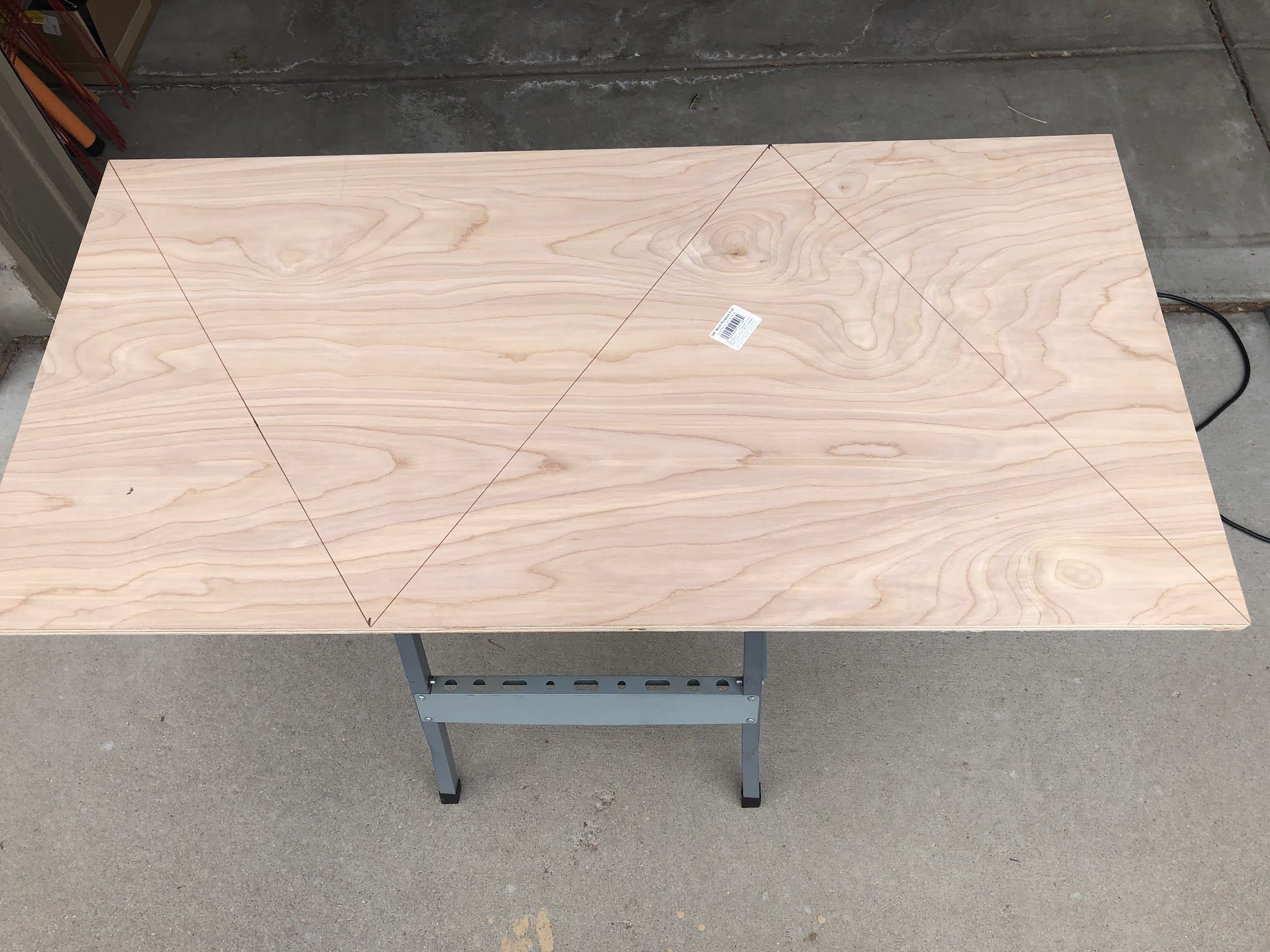
I clamped a guide on before cutting with a circular saw. I should have used a plywood blade, but I didn't have one laying around. It splintered a little, but not bad.

Here's the 18 in. pipe with the VESA clamp.

And the whole thing with a Pi 400.

Requried software
I work to do most things via the keyboard instead of the mouse. Having a clipboard manager is huge. Here are a few things I use.
Linux
MacOS
Also, I like information on the desktop.
- https://www.rainmeter.net/
- http://tracesof.net/uebersicht/
- https://github.com/brndnmtthws/conky/wiki
Wednesday, October 21, 2020
How do you pronouce SIEM?
MS200667 tmp grep '^.ie.$' /usr/share/dict/words
aiel
bien
bier
dieb
diem
dier
diet
gied
gien
kiel
kier
lied
lief
lien
lier
lieu
Miek
mien
pied
pien
pier
Piet
piet
riem
rier
sier
tied
tien
tier
vier
view
Thursday, October 1, 2020
Cinnamon settings
Settings, Windows, Behavior
Setting, Keyboard, Layouts, Options
weather@mockturtl
hwmonitor@sylfurd
Thursday, August 20, 2020
CMMC resources
Here are the most important CMMC resources.
- https://dodprocurementtoolbox.com/site-pages/cybersecurity-dod-acquisition-regulations specifically the FAQ.
- https://www.reddit.com/r/CMMC/
- https://www.federalregister.gov/documents/2020/09/29/2020-21123/defense-federal-acquisition-regulation-supplement-assessing-contractor-implementation-of
- https://www.acq.osd.mil/cmmc/draft.html
- https://cmmcab.org/
- https://www.cmmc-coa.com/
- https://fas.org/irp/doddir/dod/i5200_01.pdf
- https://www.cmmcaudit.org/category/latest-cmmc-news/
- https://discord.com/channels/579151027169918986/579151027169918989
- https://www.reddit.com/r/NISTControls/comments/i94avn/nist_800171cmmc_where_to_start/
- https://www.reddit.com/r/NISTControls/
- https://www.pivotpointsecurity.com/the-virtual-ciso-podcast/
- https://csrc.nist.gov/publications/detail/sp/800-172/final
- https://securityhub.usalearning.gov/index.html
- https://securityhub.usalearning.gov/content/story.html
- https://www.reddit.com/r/NISTControls/comments/g2304p/where_can_one_find_free_cmmc_policy_templates/
Friday, October 18, 2019
Oily coffee beans
So we have a Gaggia Brera superautomatic espresso maker. It makes great espresso but refuses to feed oily coffee beans. Here's a list of those that aren't and those that are too oily.
Not too oily:
Not too oily:
- Nicoletti Coffee Espresso Roast Beans https://www.nicoletticoffee.com/
- Most of the actual Italian beans, such as those from Lavazza
- Verena Street Shot Tower Espresso
- Dazbog White Nights Espresso
- Kicking Horse Cliff Hanger Espresso
- Kicking Horse Three Sisters
Friday, July 5, 2019
This just gets worse and worse
More macos strangeness.
#include <stdlib.h>
#include <errno.h>
#include <unistd.h>
#include <stdio.h>

int main(int argc, char** argv) {
    int pid = fork();

    if (pid == 0) {
        printf("child, errno: %d\n", errno);
        exit(0);
    } else {
        printf("parent, errno: %d\n", errno);
        exit(0);
    }
}
$ ./a.out
parent, errno: 0
child, errno: 22
Sunday, June 23, 2019
MacOS/Darwin/Mach sleep weirdness
A system call to sleep returns 0 as it should, but set errno to 60 "ETIMEDOUT Operation timed out." which it really shouldn't, especially on a return of 0. https://pubs.opengroup.org/onlinepubs/009695399/functions/sleep.html states "No errors are defined." Here's some C proof.
#include <stdio.h>
#include <unistd.h>
#include <sys/errno.h>

int main(int argc, char **argv) {
    printf("this looks good: %d\n", sleep(1));
    printf("this does not: %d\n", errno);
}
this looks good: 0
this does not: 60
Sunday, February 10, 2019
We're not in Kansas
I've been using the excellent MaxMind Geo IP database (https://www.maxmind.com) in a Python application (https://github.com/drsjb80/HPotter). Interestingly, when I look a MSU Denver's IP address:
$ python3
Python 3.7.1 (default, Nov 18 2018, 09:59:08)
[Clang 10.0.0 (clang-1000.11.45.5)] on darwin
Type "help", "copyright", "credits" or "license" for more information.
>>> import geoip2.database
>>> reader = geoip2.database.Reader('/usr/local/lib/python3.7/site-packages/_maxminddb_geolite2/GeoLite2-City.mmdb')
>>> reader.city('147.153.5.6').location
geoip2.records.Location(average_income=None, metro_code=None, time_zone=None, population_density=None, longitude=-97.822, postal_code=None, postal_confidence=None, accuracy_radius=5, latitude=37.751)
the lat/long says we're in Kansas, in the middle of a reservior acutally:
 Who knew?
$ python3
Python 3.7.1 (default, Nov 18 2018, 09:59:08)
[Clang 10.0.0 (clang-1000.11.45.5)] on darwin
Type "help", "copyright", "credits" or "license" for more information.
>>> import geoip2.database
>>> reader = geoip2.database.Reader('/usr/local/lib/python3.7/site-packages/_maxminddb_geolite2/GeoLite2-City.mmdb')
>>> reader.city('147.153.5.6').location
geoip2.records.Location(average_income=None, metro_code=None, time_zone=None, population_density=None, longitude=-97.822, postal_code=None, postal_confidence=None, accuracy_radius=5, latitude=37.751)
the lat/long says we're in Kansas, in the middle of a reservior acutally:

Thursday, January 11, 2018
Nikon View NX and sleepy OS X
For some unknown reason, View NX from Nikon craps out when OS X goes to screen saver. Here is what I had to change the power settings to in order to export ~500 photos without being present during:
 I suppose I could spend the time to figure out which setting matters and/or dtrace the process, but really Nikon: is this my resposibility? Your software matters almost as much as your hardware.

Sunday, November 12, 2017
Error 720 on Windows VPN
This worked: https://superuser.com/a/1181732 and I don't see why it should. I'll never fathom the way of Windows.
Subscribe to:
Posts (Atom)