It appears a well-known problem that when an external USB hard drive sleeps to save power, Linux becomes very confused. I tried modifying the drive's settings to no avail. My cheesy answer is to not let the drive sleep using a cron job. Do "sudo crontab -e" and put a line like:
0,10,20,30,40,50 * * * * echo "junk" > /mnt/steve/keepawake
in the crontab, with the correct path to the file on your machine of course. You don't have to be root of course, if you have permissions to write to a partition on the drive.
Monday, April 4, 2011


Wednesday, March 30, 2011
Adjusting band on Rado ceramic watch
I didn't find any instructions on the web on how to do this, so here are some. It wasn't obvious to me at first, but in the end, there really is only one thing to do: remove the one visible pin near the clasp:
 I recommend you take pictures, just like I did... Once the pin (well, pins if you adjust both sides) is/are removed, one can slide the outer link off the inner link:
 Note that there are two sizes of outer and inner links; keep track in order to put them back correctly.
 One has to allow the inner links to bend over in order to remove the outer links.
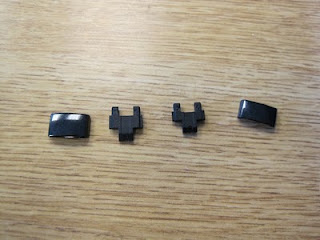 Here's a picture illustrating the different sized inner and outer links. Assembly is the reverse as they say. All in all, a clever system.


Thursday, February 24, 2011
Friday, February 18, 2011
7 +- 2
The issue with computer science (well, and all other engineering disciplines) is complexity. We can't deal with how complex our "artifacts" are. Our brains are built with a working memory size of about seven objects. Maybe hunting parties, or family sizes, were seven? Using any more of our brains to track more things was a waste and would lead to a loss of efficiency? Is this why telephone number are seven digits long? Don't know. What I do know is that once something we're looking at has more than seven objects, we are incapable of understanding it. More than seven visible variables, nesting levels, etc., and we can't understand what we're looking at. Hence functional decomposition and object-oriented programming. Most people whom claim to do OO, don't, but that's a post for another day. For today, check out http://coloradmin.com/circle.html for a visual demonstration of the property. Most people can only count to 7 (+-2) without having to "chunk" (group and then count). See: http://en.wikipedia.org/wiki/The_Magical_Number_Seven,_Plus_or_Minus_Two for a more rigorous treatment of this.
Tuesday, February 8, 2011
dd surprise
I was testing the speed of external USB harddrives and ran across something that surprised me. I have assumed for a while that increasing the block size while doing a dd improved throughput but I tested anyway, and it didn't. Here are the figures for not specifying block size, and then using 500k, 1m, and 500m:
 10,460,172 bytes/sec
 10,385,009 bytes/sec bs=500k
 10,529,657 bytes/sec bs=1m
9,573,095 bytes/sec bs=500mTuesday, February 1, 2011
Applescripting notes
I wish i had more time to learn about Applescript as there are a bunch of things i'd like to do with it... One thing i've done is create this small script to unmount volumes and put my MacBook Pro to sleep:
So, run the AppleScript Editor and develop or paste what you want. Click "Compile". Do a "Save As" and save it to your home directory's Library/Scripts directory with a name such as "Eject and Sleep".
Then, you can also map a key to it: System Preferences, Keyboard, Keyboard Shortcuts. Choose Application Shortcuts, click '+'. Choose All Applications, Menu Title: Eject and Sleep, or whatever you typed before, and end the key combination you'd like...
Another thing one can map are "Services" on object such as directories. So, if you can left click on a folder and there is something listed under Services, you can create a keyboard shortcut for it. Here are two images demonstrating that.


tell application "Finder"
    eject (every disk whose ejectable is true)
    sleep
end tellSo, run the AppleScript Editor and develop or paste what you want. Click "Compile". Do a "Save As" and save it to your home directory's Library/Scripts directory with a name such as "Eject and Sleep".
Then, you can also map a key to it: System Preferences, Keyboard, Keyboard Shortcuts. Choose Application Shortcuts, click '+'. Choose All Applications, Menu Title: Eject and Sleep, or whatever you typed before, and end the key combination you'd like...
Another thing one can map are "Services" on object such as directories. So, if you can left click on a folder and there is something listed under Services, you can create a keyboard shortcut for it. Here are two images demonstrating that.


Friday, January 28, 2011
Hugin, great with strange errors...
I love hugin (http://hugin.sourceforge.net/) -- it does a great job of stitching pictures together to make a panorama. I ran into a weird problem -- i kept getting "unconnected image group" errors. I tried setting the control point generators (not strictly need in the latest version) but each reported "Configured, not installed". Strange. The problem turned out to be that i installed hugin in a subdirectory of /Applications on my Mac and it didn't much like that. Moved it to /Applications and all was well...
Here's an example panorama from photos I took at Canyonlands National Park outside of Moab Utah.

Here's an example panorama from photos I took at Canyonlands National Park outside of Moab Utah.

Subscribe to:
Posts (Atom)